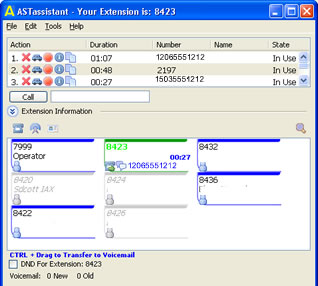
ASTassistant
ASTassistant.zip 1.1.0.11 - Windows
April-1 -2008
ASTassistant-Linux.tar.gz 1.1.0.7- Linux
Oct-13-2007
in order to run the binary in Linux you must have:
GTK+ 2.0 (or higher)
glibc-2.3 (or higher)
CUPS (Common UNIX Printing System)
libstdc++.so.5 (NOT libstdc++.so.6)
ASTassistant is easy to use freeware for managing phone calls via the Open Source Asterisk PBX platform.
ASTassistant works with Asterisk and other commercial products based on its architecture utilizing the SIP and IAX protocol over VOIP. Compatible Asterisk distributions, which are configured via FreePBX, seem to run ASTassistant best. (i.e trixbox and CentPBX)
Compatibility
Windows - Currently I have only tested with Windows XP, Vista and FreePBX 2.3.1 (FreePBX.org)
Linux - Currently I have only tested with Fedora Core 6 and FreePBX 2.2.0 (FreePBX.org)
How to Install
Place ASTassistant.exe in a directory. ASTassistant uses a config file called ASTassistant.dat in the same directory as the executable. If you dont have one it will prompt you with a message to go into 'Tools -> Options' and apply your configuration. At that point at ASTassistant.dat will be created for you.
ASTassistant makes use of the Asterisk Call Manager to monitor incoming and outgoing calls. By default, external access to the call manager is blocked. You can add a new user in the following steps:
Log into the FreePBX administration module and click on Tools -> Asterisk API.
In the Deny field put: 0.0.0.0/0.0.0.0
In the Permit field put the IP address of the PC that will be running the ASTassistant software: 192.168.1.100/255.255.255.255
Make sure that the ALL is checked for Read
Make sure that SYSTEM, CALL, LOG, and COMMAND is checked for Write
CHAT: In order for chat to work you must have UDP port 25687 open for send and receive on your computer or you may get errors.
BETA 1.2.0.5 - NEW LAYOUT
Windows (8/11/2008)
+ Fixed entry length to "Call To" Button
+
Double click to call extension is now working
+ Extensions load faster
+ Fixed URL pop-up, outgoing calls were running the incoming url
+ Fixed info button list
+ Chat should now connect to more servers
+ Ability to choose when a URL pop-up happens (on RING or on ANSWER)
+ The URL pop-up now only shows when a call is picked up. You can also use ##EXT##, ##QUE## or ##URL## (from SendURL).
+ Right click on the incoming call log and add to contacts
+ Improved IRC chat, private messages are shown in blue
+ Now remembers the last state of the main window (height, width, location)
+ Drag and drop directly to Voicemail
+ Drag and drop to Parking Lot
+ Extension list now runs from top to bottom.
+ Added icon to extension list if user has voicemail enabled
OTHER
Here is a Hylafax client for your consideration. Windows Only.
You need to add a user via the faxadduser:
faxadduser -a adminpass -p userpass -u 100 username
HYLAassistant.zip (5/4/2008)